LK's Current Status And Show Title

Streaming Live Video

Furthermore you guys can chat online and ask your questions

LK-Communication LAB Shows Video

LK's Own Advertisement Board

Monday, July 28, 2008

Power OFF But Your PC Still ON (Uninterruptible Power Supply)

MONDAY
11.50pm
28 July 08


Question: Howdy LK, well, i'm a student in PUO and i'm staying in arent house, And here we will always face a power down, and that always happened when i'm doing assignment......Is there any accessories to keep my computer run atleast 5min weather the power is off, so that i can save my works.
By Daniel From Perak.


Well, hello daniel, i have face that problem too......it will really make fadup when the power is off.... nothing is perfect, weather the microsoft have a recovery tool sometimes it too failed ...yet we dont have much time to finish the assignment and to print it after the power is back.....god please help me......


alright.....You no need to bother the God just ask your help in here your TECH SUPPORT CENTRE


i will suggest you an UPS (Uninterruptible Power Supply)

Well, this is a battery powered unit, where it will supply power to your computer when the power is out.

The process is like this,

When your power is ON, The UPS will work as a power backup device,where it will charge the battery and work as a AVR (Automatic Voltage Regulator).

When power is cut,
It will produce a power by a battery to your computer.

How long it can produce power to your PC is depense on the type of UPS that you buy.
A very minimum is 5 minute.


I have one and i buy it about 130bucks that is RM130.00 at the lowyat plaza.And its maked by a TECOM company. It can produce for 2plugs. And stable for 10minutes.

And hey,i think you can get it more cheaper,becuse an PC FAIR is going to be held on this coming sunday at KLCC.


More About UPS

An uninterruptible power supply (UPS), also known as a continuous power supply (CPS) or a battery backup is a device which maintains a continuous supply of electric power to connected equipment by supplying power from a separate source when utility power is not available. It differs from an auxiliary power supply or standby generator, which does not provide instant protection from a momentary power interruption. Integrated systems that have UPS and standby generator components are often referred to as emergency power systems.
There are three distinct types of UPS: off-line, line-interactive and double conversion (also called on-line). An off-line UPS remains idle until a power failure occurs, and then switches from utility power to its own power source, almost instantaneously. An on-line UPS continuously powers the protected load from its energy reserves stored in a lead-acid battery or flywheel, while simultaneously replenishing the reserves from the AC power. It also provides protection against all common power problems, and for this reason it is also known as a
power conditioner and a line conditioner.
While not limited to safeguarding any particular type of equipment, a UPS is typically used to protect
computers, telecommunication equipment or other electrical equipment where an unexpected power disruption could cause injuries, fatalities, serious business disruption or data loss. UPS units come in sizes ranging from units which will back up a single computer without monitor (around 200 VA) to units which will power entire data centers or buildings (several megawatts).
Historically, UPSs were expensive and were most likely to be used on expensive computer systems and in areas where the power supply is interrupted frequently. As prices have fallen, UPS units have become an essential piece of equipment for data centers and business computers, and are also used for personal computers, entertainment systems and more.

More About UPS In WIKIPEDIA


Thanks for your mail Daniel,
Keep mailing.

Using 2 Mouse In One PC

MONDAY
5.20pm
28 July 08


Question: Nice to meet you LK, can i use 2 mouse on my pc, i mean in one pc, and how to do that...Will my system support?
By Radha From Selayang.


Well, hi radha......so you wanna use two mouse hah.....yeah sure,you can use,you have to get two different type of mouse such as one is USB and PS/2 Or use each as USB.


And i'm not sure why are you wanna use two mouse in one computer...if planned to play any game,you can try for JOYSTICK. You can combine your mouse and joystick or use two joystics.
Anyhow....Decide for your use, i just said about it for a knowledge.
Thanks for your mail RADHA,
Hope you got what you want.


How To Remove Your Floppy Drive

MONDAY
11.15am
28 July 08


Question: I dont use any floppy disket anymore, can i remove it...? can i use my pc without it?
By SELVAN From Segambut


Hi, selvan, wel you can remove it, but some computers wont boot without the floppy drive, computers like that need to be configured on the BIOS.


Steps to remove/dismental the FloppyDrive from your casing


1.First unplug the power connector fromthe floppy drive.

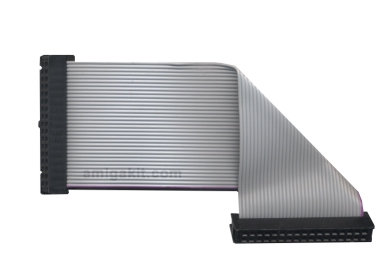
2.Then unplug the floppy drive data cable.


3.Then unscrew the drive.

Then you are on. there you go, you have unplugged your floppy drive from your computer.

FLOPPY POWER CONNECTOR

Floppy Drive Data Cable

About BIOS


In computing, the BIOS (pronounced /ˈbaɪoʊs/) is an initialism stands for the Basic Input/Output System according to the IBM Personal Computer

BIOS in part refers to the
firmware code run by a PC when first powered on, which is a type of boot loader. The primary function of the BIOS is to identify and initialize system component hardware (such as the video display card, hard disk, and floppy). This is to prepare the machine into a known low capability state, so other software programs stored on various media can load, execute, and assume control of the PC.[ This process is known as booting, or booting up, which is short for bootstrapping. Among other classes of computers, the generic terms boot monitor, boot loader or boot ROM were commonly used. Some Sun and Macintosh PowerPC computers used Open Firmware for this purpose. There are a few alternatives for Legacy BIOS in the x86 world: Extensible Firmware Interface, Open Firmware (used on the OLPC XO-1) and coreboot.
The BIOSes of
IBM PC class machines can also be said to be a coded program embedded on a chip that recognizes and controls various devices that make up x86 personal computers, and provides a small library of basic Input/Output functions that can be called to operate and control the peripherals such as the keyboard, primitive (800 x 600) display functions and so forth. Computers designed to run Windows ME or Windows 2000, or later, supersede this basic monitor functionality by taking over direct control of the interrupt table and replacing the monitor routines with faster and more robust low-level modules that, unlike the BIOS function set, are re-entrant. Various BIOS functions in ROM were left in control in earlier windows versions, and the BIOS only comes into play today in the alternate shell CMD.exe, or if the machine is booted into a legacy DOS version.[citation needed]
The term first appeared in the
CP/M operating system, describing the part of CP/M loaded during boot time that interfaced directly with the hardware (CP/M machines usually had a simple boot loader in ROM, and nothing else). Most versions of DOS have a file called "IBMBIO.COM" or "IO.SYS" that is analogous to the CP/M disk BIOS.
The term is incorrectly known as Binary Input/Output System, Basic Integrated Operating System and occasionally Built In Operating System.


More about BIOS On Wikipedia click HERE


If you need any BIOS setting for your computer to disable this Floppy drive just drop me a line.
Thanks for your mail Selvan.
Keep mailing.

Tips For Buying CD Writers For Your PC

MONDAY
10.40pm
28 July 08


Question : I'm daniel from SA Sect 17, i would like to buy an writer for my PC, i need your tips/suggestion to buy it, and which one is suitable.


CD-RW

Is the drive which can burn only CD's And Audio CD.


Alright, buying a CD-RW is waste of your money....


Come on guys,nowdays even for a data usage we are transferring about a size of gig.


So i better advice you to buy an DVD-RW.
DVD-RW
This drive can burn AUDIO CD, Audio DVD, VCD, DVD, CD-R/RW, DVD-R/Rw.
It only can burn,it can play those formats too.
Hope you know the differents now.


Thanks for your mail Daniel,Nice too meet you.
i'm at the sect 19 dude.
anyhow keep mailing.

My Pendrive Antivirus (Removable Drive Antivirus)

Monday
10.30pm
28 July 08


Question: Hi, LK,....me again,....you've told usthat you have create an Pendrive Antivirus, can weget it, is it available in the Net....is that a free software or paid one...?
by Jeevan From S'pore


Hi,Jeevan, my Pendrive Antivirus is not available in Net or market, because i dont have any plan to sell it you know moreover i've not register my software for the public use also....And its not that much of user friendly.....


I will try my level best to improve it, so that i canmake it available in the market.


About my software me and my little brother who create and program it.

thanks for your interest on my software.


STARTUP SCREEN


Default Icon

Thanks alot for your mail Jeevan.
i'll try my level best to make my software available in the market very soon.
Keep in touch

Mainboard Standard Ports Labels(Ports back in Your PC Casing)

MONDAY
4.45pm
28th July 2008


Question: LK can you let me know of the ports in rear of computer casing.
By MAx from Sentul


Well, There you go, these are the standard mainboard ports tat mostly you can see back at your pc casing.


SERIAL PORT
(where you insert in the serail version mouse )
USB Port
Universal Serial Bus: a protocol for transferring data to and from digital devices. Many digital cameras and memory card readers connect to the USB port on a computer. A single USB port can be used to connect up to 127 peripheral devices, such as mice, modems, and keyboards. USB also widely supports Plug-and-Play installation (reducing the need to install special software for connectable devices) and hot plugging (removing and adding of devices without the need to switch off or restart your machine).
These days, you're likely to find USB ports on the front of your machine, as well as the back, as USB devices are universally popular and are in frequent use. Older USB ports will typically be USB 1.1, supporting data rates of up to 12Mbps. Just about every USB device and computer sold these days will work at the high-speed specification of USB 2.0, capable of transferring data at a rapid 480Mbps.

RJ-45 Ethernet port
A local-area network (LAN) architecture developed by Xerox Corporation in cooperation with DEC and Intel in 1976. Ethernet uses a bus or star topology and supports data transfer rates of at least 10 Mbps, with higher rates on Fast Ethernet and Gigabit Ethernet standards. Ethernet is the most widely implemented LAN standard.
A modern version of Ethernet, called Fast Ethernet (or 100Base-T), supports data transfer rates of 100 Mbps, typically compatible with standard Ethernet connections.
The best new major version is Gigabit Ethernet, supporting data rates of 1 gigabit (1,000 megabits) per second.

PS/2 Ports
The PS/2 Ports are simple, 6-pin, low-speed connections commonly dedicated to a keyboard and mouse. Although these ports may look identical at first glance, they are not interchangeable, so you'll need to attach the keyboard and mouse to their respective PS/2 port. Luckily, all modern computers have colour-coded connectors, with keyboards designated as light purple, with a computer mouse using green.If you elect to use a USB keyboard and mouse, you can typically disable the PS/2 ports in the system's CMOS setup and free the PS/2 system resources for other devices.
Modem RJ-11 Jack
The presence of this usually indicates that you have an internal modem, giving you up to 56kps internet access through dial-up. RJ-11 is short for Registered Jack-11, a four- or six-wire connector used primarily to connect dial-up modems and other telephone equipment. RJ-11 connectors are also used to connect some types of local-area networks (LANs), although RJ-45 (Ethernet) connectors are more common.
VGA Monitor Port

Video Graphics Array: used to connect a CRT monitor to the computer.


Mini Audio JACK

With just about every sound card, you get three 3.5mm sockets. The green socket is known as the 'line-out' socket, and is the most commonly used, as it outputs audio from the PC. Ready for headphone or speaker usage. The blue socket is 'line-in' and as the name suggests, does the opposite of line-out, by acting as an audio input, so you can play audio and have it recorded in certain PC sound programs, using this connection. The pink socket is also an audio input device, and is designated for analogue microphones.


DB 25 parellel Port
The parallel port is not usually supported on modern PCs. Typically used for printers, the modern range of printing equipment has preferred to use USB connectivity for single PCs, with network capabilities via Ethernet and wireless for a growing number of network-enabled printers. You'll find some printers do include parallel connections for older computers.


Well, there is more ports but these are the mostly used and available in personal computers and laptops.
Thanks for you mail Max,
keep mailing.

Sunday, July 27, 2008

CURSOR Gone In Screen (End Task CursorXp)

Sunday
27-07-08
mailed on 25-07-08


Question: I was using CursorXp hope you know about it... 3 days ago my pc is hanged after i installed an software. After that i have remove it and i made some changes in MSCONFIG. After that my cursor is gone. I cant see mycursor. can you help me to to find cursor.....Thanks....
By Shanti From KLANG


Well, hi shantisorry for the late reply, and hey you should proud your mail is been read on the 7th Golden Day Of LK COMMUNICATION LAB show....

Ok, answer for your question is.....Actually, your cursor is not gone...it is there but you disabled the skin forthe cursor....you know without the skin you can see the cursor so am the humans and ay other living thing,right........
ok what you have to do is you have to use your KEYBORD SHORTCUTS....

thats is... after logged in to your profile use these keys to change your mouse pointer.....

press WINDOWS BUTTON on your keyboard
press C to open control panel

Use these steps if you are using the CATEGORY VIEW

press TAB Button on your Keyboard Six times or untill you see the PRINTERS AND OTHER HARDWARE link is highlighted.

Press ENTER on your Keyboard
and press the TAB button again for 9times or until the MOUSE link is highlighted then click ENTER.

Now you have open your mouse properties now press TAB button on your keyboard for 5times or until the BUTTONS tab is highlighted.

Then press your RIGHT ARROW on your keyboard then press the TAB and press the DOWN ARROW on your keyboard. Then you can select your pointers after selected press TAB untill the OK button is highlighted, then press the SPACEBAR then you go you have your cursor gain.....i means you have found your missing cursor.....in my language you have gave a skin for that cursor.....

anyway, thanks alot for your mail Shanti,and about your one more question ill talk about in nextshow.
regards.

7Th Successfull Day Of The LK Communication LAB Show

SUNDAY
27-06-08


Its a succesfull 7th day of the show, here i like to thank all os my viewers and myfriends who support me to do this show. hope i will haveyour support forever. Thanks alot guys.


7T Day Golden LK COMMUNICATION LAB Theme Soundtrack

Thanks alot for your support Ladies And Gentlemen. I will try my best to improve this show.
From LK.

Saturday, July 26, 2008

My Mobile Ringtones

FRIDAY
25-July-08
1.15pm


Question: Greetings LK, Hope you are fine, Did you use any credit cards....?Just asking...
My question is: Where did you download your ringtones for your phones any free webpages....? or did you create by your own....
By DeChris From Perak.


hi, Dechris,yes im fine here thank you. alright usually i'll like create my ringtones by my own....
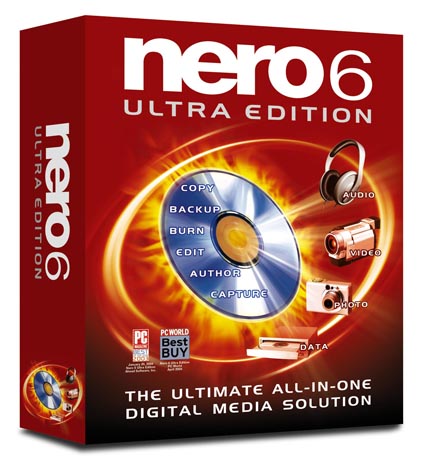
i use an software from NERO 6.0 ULTRA EDITION. Its a shareware software to use.

it contains a application named WAVE EDITOR.

where i can use it to cut,copy,paste and save it to MP3,WMA,WAVE and WMA.


I can suggest you an freeware that you can create your own ringtone by mixing or cut any mp3's.
its a Be a Ringtone DJ and Mix Multiple MP3s 5.2.


Make cool free ringtones by mixing your MP3's, like a DJ. Make your phone unique.
Be a Ringtone DJ.
Make cool free ringtones by mixing your MP3's, like a DJ. Make your phone unique.
Mix your favorite MP3s and create the wildest, coolest ringtones.
Select exactly the part of the song you want to mix, and then add the track. This is a powerful, free software that lets you have complete control. You will be creating cool ringtones in minutes. And they are free!

CLICK HERE TO DOWNLOAD

Its a completle FREE Software and what you have to do is just Register in their databse and get the activation code to unlock the software then you are ON. You can create your own ringtones

FREE RINGTONE WEBSITE


CLICK HERE TOSEE THE GOOGLE RESULT

Thanks for your mail DeChris.
Hope you ot what you want.

Friday, July 25, 2008

TV CARD For Your PC

FRIDAY
25-Juy-08
7.45pm


Question: Hello, LK how are you? i'm studying in JB and i stay with my friends in a rent house. here we dont have any entertainment such as TV. My question iswhat PC Card that i need to buy to play TV on My Computer.
By MAGEN From JB (Johor Bharu)


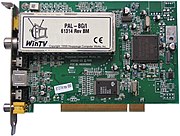
hello,Magen.glad to hear from yaa....I have face this situation before....alright, what card you need is a TV TUNER ot TV CARD.

its available in many different interfaces. you better use the PCI one.


i have one that is a PIXELVIEW Play TV Pro Ultra High Definition
and i buy it for 240bucks that is 240 Ringgit Malaysia.

Where is even can tune for FM radio, can receive input video and record it.

Its Fully Remote Controlled.


More About TV TUNER CARD

A TV tuner card is a computer component that allows television signals to be received by a computer. Most TV tuners also function as video capture cards, allowing them to record television programs onto a hard disk.


TV tuners are available in a number of different interfaces: as PCI-bus expansion card, PCIe (PCI Express) bus or USB devices. Ethernet-connected devices also exist.(HDHomeRun) In addition, some video cards double as TV tuners, notably the ATI All-In-Wonder series. The card contains a tuner and an analog-to-digital converter (collectively known as the analog front end) along with demodulation and interface logic. Some very cheap cards lack an onboard processor and, like a Winmodem, rely on the system's CPU for demodulation.

There are currently four kinds of tuner card on the market:

Analog TV tuners Cheaper models output a raw video stream, suitable for real-time viewing but ideally requiring some sort of compression if it is to be recorded. More expensive models encode the signal to Motion JPEG or MPEG, relieving the main CPU of this load. Many cards also have analog input (composite video or S-Video) and many also provide FM radio reception. Digital TV tuners Digital TV is broadcast as an MPEG-2 stream, so no encoder is necessary; instead, the digital cards either provide the whole MPEG transport stream or extract the individual (audio and video) elementary streams.

Hybrid tuners A hybrid tuner has one tuner that can be configured to act as an analog tuner or a digital tuner. Switching in between the systems is fairly easy, but can not be done "on the fly". The card operates as a digital tuner or an analog tuner until reconfigured.

Combo tuners This is similar to a hybrid tuner, except there are two separate tuners on the card. One can watch analog while recording digital, or vice versa. The card operated as an analog tuner and a digital tuner. The advantages over two separate cards are cost and utilization of expansion slots in the computer. As many regions around the world convert from analog to digital broadcasts, these tuners are gaining popularity.


Like the analog cards, the Hybrid and Combo tuners can have specialized chips on the tuner card to perform the encoding, or leave this task to the CPU. The tuner cards with this 'hardware encoding' are generally thought of as being higher quality. The small USB tuner stick have become more popular in 2006 and 2007 and are expected to increase in popularity. These small tuners generally do not have hardware encoding due to size and heat constraints.
While most TV tuners are limited to the radio frequencies and video formats used in the country of sale, many TV tuners used in computers use DSP, so a firmware upgrade is often all that's necessary to change the supported video format. Many newer TV tuners have flash memory big enough to hold the firmwares for decoding several different video formats, making it possible to use the tuner in many countries without having to flash the firmware. However, while it is generally possible to flash a card from one analog format to another due to the similarities, it is generally not possible to flash a card from one digital format to another due to differences in decode logic necessary.
Many TV tuners can function as FM radios: this is because there are similarities between broadcast television and FM radio. The FM radio spectrum is close to (or even inside) that used by VHF terrestrial TV broadcasts. And many broadcast television systems around the world use FM audio. So listening to an FM radio station is simply a case of configuring existing hardware
.


More Info About TUNER CARD In WIKIPEDIA CLICK HERE

WHERE CAN I BUY IT

And i'm sure you can buy it at any computer stores. Or in KL Lowyat plaza/Imbi Plaza Or in Klang Centrepoint and Klang City Square or in shah alam Ole Ole Shopping Centre.

thanks for your mail Mr.Magen

Hope you got what you want.

I Have Direct A Movie (Telemovie)

FRIDAY
25-JULY-08
5.45pm


Question: whatsup LK...Well, i got a interesting info about you....I heard that you have direct a movie..Is that true? Let us know about it...As your fan we like to know about it. Did you woking any movie right now...?
by Clara From Shah Alam


hi, clara long time no see....how are you....Clara is my old friend...]
Alright, yeah clara i have worked as a DIRECTOR,Screenplay,Scripts,Story,Assistant Music Director And Editor. Its a Tamil version TELEMOVIE, its acording to a ghost, And based on true story of my life.

And im working on another horror movie too....but its still in shooting....
And this is a sample of the trailer


its not been release yet sorry for the wrong date.


thanks for your mail girl
Keep in touch.

Test Your 3D Hardware (dxdiag)

FRIDAY
25-JULY-08
3.50pm


Question: Hi LK...? Thanks alot for your Help on my Startup Error Problem on KAVE virus things....Owh,mani'm becoming your fan nowdays.....
Alright, i just wanna ask you how to check my graphic card...I mean i wanna test it, so that my graphic card is can support my 3D animations or games...?
By REBECCA from KUALA LUMPUR.


Hi, Rebecca, i'm glad to hear that i have a fan.....
Alright about your question i think you can use DirectX Diagnostics.


Its a collection of application programming interfaces (APIs) for handling tasks related to multimedia, especially game programming and video, on Microsoft platforms.

More About DIRECT X


Microsoft DirectX is a collection of application programming interfaces (APIs) for handling tasks related to multimedia, especially game programming and video, on Microsoft platforms. Originally, the names of these APIs all began with Direct, such as Direct3D, DirectDraw, DirectMusic, DirectPlay, DirectSound, and so forth. DirectX, then, was the generic term for all of these APIs and became the name of the collection. After the introduction of the Xbox, Microsoft has also released multiplatform game development APIs such as XInput, which are designed to supplement or replace individual DirectX components.
Direct3D (the 3D graphics API within DirectX) is widely used in the development of computer games for Microsoft Windows, Microsoft Xbox, and Microsoft Xbox 360. Direct3D is also used by other software applications for visualization and graphics tasks, most notably among the engineering sector for CAD/CAM, because of its ability to quickly render high-quality 3D graphics using DirectX-compatible graphics hardware. As Direct3D is the most widely publicized component of DirectX, it is common to see the names "DirectX" and "Direct3D" used interchangeably.
The DirectX software development kit consists of runtime libraries in redistributable binary form, along with accompanying documentation and headers for use in coding. Originally, the runtimes were only installed by games or explicitly by the user. Windows 95 did not launch with DirectX, but DirectX was included with Windows 95 OEM Service Release 2.[1] Windows 98 and Windows NT 4.0 both shipped with DirectX, as has every version of Windows released since. The SDK is available as a free download. While the runtimes are proprietary, closed-source software, source code is provided for most of the SDK samples.
The latest versions of Direct3D, namely, Direct3D 10 and Direct3D 9Ex, are exclusive to Windows Vista. The reasons, as Microsoft claims, is that there were extensive changes in the Windows graphics architecture, and in particular the introduction of the Windows Display Driver Model. Critics argue that there may be possible commercial motives as well. This redesign of the graphics infrastructure for Windows Vista supports virtualizing graphics hardware to multiple applications and services such as the Desktop Window Manager, in contrast to the exclusive access afforded to DirectX applications on Windows XP. Both Direct3D 9Ex and Direct3D 10 rely on the WDDM infrastructure and WDDM drivers.

More About DIRECT X In Wikipedia CLICK HERE


WHERE TO GET THE SOFTWARE


Its a Free Software That is included in your Windows What you have to do is just keep updating it.....


CLICK HERE TO DOWNLOAD THE DIRECT X Version 9.0 c


HOW TO USE IT

START > RUN type dxdiag And OK


it will ask an question "do you want to allow DxDiag to check......" Just Click YES
at the bottom let the ProgressBar to full.


Then go on you can testyou 3D hardwares at the DISPLAY TAB.

By there you can get more information about your computer, your sound hardware and your Graphic card too...

Thanks for your mail Rebecca Keep in touch,

Good Luck.

Thursday, July 24, 2008

Remove Virus KAVO.exe Symptoms (Kavo.exe Not Found)

THURSDAY
24-07-08

7.45pm


QUESTION: My PC has been attacked by an virus named KAVO.exe. But i suceed to clean it from my computer by using my antivirus. But after i remove the virus i was getting this weired message box everytime when i start my computer. The error says " CANNOT FIND kavo.exe, or the shorcut is missing". I just want to ask your help, how to remove that and is it possible or i have to reformat my pc. By Rebecca From KUALA LUMPUR.


Well, hi ok, what i got to know is your system is locating/search for the kavo files, and it cant found it. it means the kavo virus have left an startup files.

STEPS TO REMOVE IT:

This steps is only to remove the symptom of the KAVO.exe virus. No to remove the virus.

Alright, What you have to do is check your START UP at the start menu.
Go to START > ALL PROGRAMS > Startup > right click and open it check weather got a file named empty.exe or empty.bat . Then remove it.

After that use my MSCONFIG style, check out on my blog you will know how to use the MSCONFIG.

at the startup of MSCONFIG

untick these files

Kavo.exe
empty.exe

and you will see an box ticked without a name.....its a trick by the trojan KAVO
untick it also....

then apply then OK, Dont restart your PC Yet.

USE WINDOWS REGISTRY

Here i'm going to teach an new method that is windows Registry.
Ok then Go to START > RUN > type regedit then Ok
then press F3
then type explorer.exe

or scrool down to the HKEY_CLASS_ROOT > APPLICATIONS > explorer

Double click the TaskbarGroupIcon on the list of names.
on the value data area remove everything then these %SystemRoot%\Explorer.exe,

Now Restart Your Computer I'm sure the ERROR message wont disturb you again.

If you need more help then mail me to LKCommunicationLAB@gmail.com
or make your video call to our show on YAHOO INSTANT MESSENGER LKCommunicationLAB@yahoo.com.my


Thanks for your mail REBECCA
Keep mailing,
thanks for your support.

TIPS ON PASSWORD

THURSDAY
24-07-08
5.45pm


QUESTION: Please give us any tips on using a steanght full password.
By XDA From KULA LUMPUR


Ok, i think this web could help you to have a strenght password, try it...
There is no REGISTRATION, LON IN or CREDIT CARD is needed, Just check on this webpage.

Thanks for ouy mail XDA
Hope you got what you want.

GRAPHIC CARDS THAT I'M USING

Thursday
24-7-08
3.35pm


QUESTION: What Graphic card are you using? did you use 2 Graphic cards in one computer or one in each. By MAVEN From JOHOR


yes, i am using two graphic cards that is nVidia NX8800 512MB Each in my main computer and MSI nVidia GeForece 128MB on my next computer.

NX8800


MSI nVidia GeForce FX5200


Thanks for your mail MAVEN
Keep mailing.
thanks for your support.

MY TECH PROJECTS

THURSAY
24-07-08
1.30pm


QUESTION: Have you done any projects on TECH, or like electronics.
By JEEVAN From KUALA LUMPUR


Yes, i have done some projects.....
One i have work on VB for create a software to protect peoples files.
Second i have create an removable drive antivirus.
And alot of webpages, one of it you can check it at http://www.criminologiest.com/ its i create it for my campus none muslim students.
And one of my electronic project is wireless flood detector.
And another project that i worked on databse, it has been brought by my campus management.
Where i have create an database system which can evaluate lecture. I name it as a LECTURE EVALUATION SYSTEM.
More about my projects, I will let you guys know. If you need any suggestion or any tips for your projects you can ask me that too...
mail your question to
Thanks for your mail Mr.JEEVAN
Hope you got what you want.
Keep on mailing.

Wednesday, July 23, 2008

FREE ANTIVIRUS (AVIRA)What antivirus That i'm Using

Wednesday
23 JULY 2008
9.45pm


Question: What Antivirus Are You Using, can you recommend any good antivirus that in market now,and it have a free version and a paid.
By Viknes From KUALA LUMPUR


Well, i'm using a AVIRA antivirus, thats a FREE EDITION. Dont rank it by just seeing the ICON/Company LOGO Its a NUMER #1 Company That Shows The Lowest Infection Risk Of All Tested Antivirus Programs


You can download it from HERE
Thanks for your mail MR.VIKNES
Hope you got what you want.

FLV CODEC (TO Play FLV Format Videos)

Wednesday
23 JULY 2008
10.45am

Question: I can't play any FLV Formated Video on My MEDIA PLAYER, Any posibilities to make it play in my computer?
By SARA From Melaka (Malacca)


Ok.....I thinkyou dont have a codec in your computer to play the FLv format videos. Alright no worries you can download the latest KLITE FREE CODEC FROM HERE
It contains alot of video and audio codecs, download it and install in you PC then you areready to play the FLV format videos.
Thanks for your mail Mr.SARA
Hope you got what you want.

Reduce Startup Files (Speedup LogIn)

Wednesday
23-JULY-08
2.22pm


Question: I Have more startup programs on my computer. I Mean, i have more unused programs running on my background,and its really making my LOGIN tobe late. I just want to ask you how to stop some unused programs from running on backgorund.
by Jegan From KLANG


hi, Jegan....Well, i think you can stop those unwanted programs to run on your background by remove them from the startup. I mean, you can remove some programs to run from background in MSCONFIG (Microsoft System Configuration Utility). You can open your MSCONFIG from typing the name in Windows RUN


Go to START > RUN type MSCONFIG


Click STARTUP in the tab Then untick the programs that you dont want them to run on background. Remember there is some important software files such as Antivirus, So you are not Adviced to untick them it could bring your system halted.

Becare full when using this......


WHAT IS MSCONFIG
MSConfig, or Microsoft System Configuration Utility, (or simply System Configuration in Windows Vista) is a utility to troubleshoot the Windows startup process. It is bundled with all Microsoft Windows operating systems since Windows 98 except Windows 2000. Windows 95 and Windows 2000 users can download the utility as well, although it was not designed for them. MSConfig modifies which programs run at startup, edits certain configuration files, and simplifies controls over Windows services. As part of the base Windows install, MSConfig can be accessed by running 'msconfig' on any system on which the user has administrator access.
Prior to
Windows Vista, files that can be edited through MSConfig include AUTOEXEC.BAT, CONFIG.SYS, WIN.INI, SYSTEM.INI on Windows 9x systems, and WIN.INI, SYSTEM.INI and BOOT.INI on Windows NT systems prior to Windows Vista. The chief benefit to using MSConfig to edit these files is that it provides a simplified GUI to manipulate sections of those files and the Windows registry tree pertaining to the Windows boot sequence. Using MSConfig, Windows can also be configured to perform a diagnostic startup (load a minimum set of drivers, programs and services).


More info On HOW TO USE MSCONFIG

Thanks for your mail Mr.JEGAN
Hope you got what you want.


Tuesday, July 22, 2008

How To Create 3D Animation (for free software)

Tuesday
22-July-08
9.00am


Question: I Like to do my own 3D animation can you suggest any of softwares to do that for free.
by makkelSKT from KUALA LUMPUR


Well, hi.....ok about the software i think this one is suitable for you that is DAZ Studio is a free software where you can ceate your own 3D animation.
You can check it out here http://www.daz3d.com/
Thanks for your mail MakkelSKT
Hope you got what you want.

Webcam For Broadcast/Web Chat

Tuesday
22-July-08
6.23pm


Question: What kind of Cam are you using forthe broadcast.
By vimal from puchong.


i'm using two different cams to broadcast this show, Where the main one is Model Of O'RITE and another one is Genuis VCam


Genuis VCAM


O'Rite
Thanks for your mail Mr.Vimal
hope you got what you want.