11.15am
28 July 08
Question: I dont use any floppy disket anymore, can i remove it...? can i use my pc without it?
By SELVAN From Segambut

Hi, selvan, wel you can remove it, but some computers wont boot without the floppy drive, computers like that need to be configured on the BIOS.
Steps to remove/dismental the FloppyDrive from your casing

1.First unplug the power connector fromthe floppy drive.
2.Then unplug the floppy drive data cable.
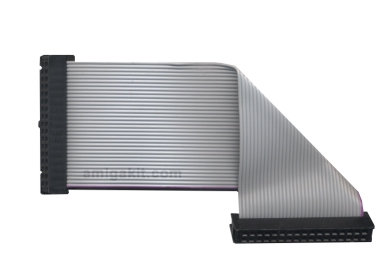
3.Then unscrew the drive.
Then you are on. there you go, you have unplugged your floppy drive from your computer.
FLOPPY POWER CONNECTOR
Floppy Drive Data Cable
About BIOS
In computing, the BIOS (pronounced /ˈbaɪoʊs/) is an initialism stands for the Basic Input/Output System according to the IBM Personal Computer
BIOS in part refers to the firmware code run by a PC when first powered on, which is a type of boot loader. The primary function of the BIOS is to identify and initialize system component hardware (such as the video display card, hard disk, and floppy). This is to prepare the machine into a known low capability state, so other software programs stored on various media can load, execute, and assume control of the PC.[ This process is known as booting, or booting up, which is short for bootstrapping. Among other classes of computers, the generic terms boot monitor, boot loader or boot ROM were commonly used. Some Sun and Macintosh PowerPC computers used Open Firmware for this purpose. There are a few alternatives for Legacy BIOS in the x86 world: Extensible Firmware Interface, Open Firmware (used on the OLPC XO-1) and coreboot.
The BIOSes of IBM PC class machines can also be said to be a coded program embedded on a chip that recognizes and controls various devices that make up x86 personal computers, and provides a small library of basic Input/Output functions that can be called to operate and control the peripherals such as the keyboard, primitive (800 x 600) display functions and so forth. Computers designed to run Windows ME or Windows 2000, or later, supersede this basic monitor functionality by taking over direct control of the interrupt table and replacing the monitor routines with faster and more robust low-level modules that, unlike the BIOS function set, are re-entrant. Various BIOS functions in ROM were left in control in earlier windows versions, and the BIOS only comes into play today in the alternate shell CMD.exe, or if the machine is booted into a legacy DOS version.[citation needed]
The term first appeared in the CP/M operating system, describing the part of CP/M loaded during boot time that interfaced directly with the hardware (CP/M machines usually had a simple boot loader in ROM, and nothing else). Most versions of DOS have a file called "IBMBIO.COM" or "IO.SYS" that is analogous to the CP/M disk BIOS.
The term is incorrectly known as Binary Input/Output System, Basic Integrated Operating System and occasionally Built In Operating System.
More about BIOS On Wikipedia click HERE
If you need any BIOS setting for your computer to disable this Floppy drive just drop me a line.
Thanks for your mail Selvan.
Keep mailing.


